
In today’s digital world, your website is often the first thing your customer sees. Imagine a client searching for your service online, finding your website, but it loads slowly, shows errors, or looks outdated. What will they think? Most probably, they will leave and visit your competitor. This is why website maintenance is not just an extra task—it is a vital business need. In Bangladesh and in the global market, companies are losing clients and money every day because they ignore website maintenance.
But here’s the good news: regular website maintenance can solve these problems. In this article, we will explain why website maintenance is so important for businesses, how it impacts your brand, and share practical tips for Bangladeshi and international companies. We will also show you why choosing a trusted partner like One Stop IT Solutions can make all the difference.
What Is Website Maintenance?
Website maintenance means regularly checking your website for problems and keeping it updated, secure, and working well. This includes:
- Updating software and plugins
- Backing up your website
- Fixing errors and broken links
- Improving speed and security
- Updating content
Without maintenance, your website can become slow, unsafe, or even stop working. This can cost your business time, money, and trust.
Let’s break down each part of maintenance a bit more:
Updating Software And Plugins
Websites are built using different platforms and tools. For example, WordPress, Joomla, or custom-built systems. These platforms use plugins or modules to add features such as contact forms, image galleries, or online shops. Software developers release updates to fix bugs, patch security holes, or add new features.
If you do not update, your website may become easy to hack or stop working with newer browsers.
Example: Imagine using an old version of a plugin for accepting payments. If there’s a bug and you don’t update, hackers might steal your customer’s card details. This can damage your business and bring legal trouble.
Backing Up Your Website
A backup is a copy of your website saved safely. If something goes wrong—like your site gets hacked or you make a mistake—you can restore your website using the backup. Think of it like insurance for your online business. Backups should be done regularly, and copies should be stored in more than one place (not just on your website server).
Fixing Errors And Broken Links
Websites can develop errors over time. Maybe a product page was deleted, or a blog post URL changed. These cause broken links, leading to “404 not found” errors. Broken links make your site look unprofessional and frustrate visitors. They also hurt your ranking on Google.
Regular checks help you find and fix these quickly.
Improving Speed And Security
Speed and security go together. A slow website can be a sign of too many unused files or outdated scripts. Security issues, like viruses or malware, can slow down your site or even get it blacklisted by search engines. Maintenance means removing old files, optimizing images, and updating security measures.
Updating Content
Content is what your visitors read or see—text, images, prices, news, or offers. If you don’t update your content, visitors might see old prices, outdated promotions, or wrong information. Updated content keeps your business looking active and trustworthy.
Non-obvious Insight: Many businesses forget that even “small” changes—like updating a phone number or holiday hours—can make a big difference for customers. If your contact info is wrong, you could lose a sale to a competitor with a working phone number.
Why Website Maintenance Is Important
1. First Impressions Matter
For most clients, your website is their first meeting with your business. If your site is slow, has old information, or shows errors, clients will lose trust. In Bangladesh and abroad, research shows that 88% of online customers will not return to a website after a bad experience. So, regular maintenance helps you make a strong first impression.
Detailed Example: Suppose you run a travel agency in Chittagong. A tourist from Germany visits your site to book a tour. The site looks old, and the booking form does not work. That visitor leaves and books with someone else. You lose not just this customer, but also everyone they could have recommended.
Extra Insight: First impressions are not just about how the website looks. Speed, security, and easy navigation also shape the visitor’s opinion. Many business owners focus only on design, but a beautiful site with errors still drives people away.
2. Security And Data Protection
Cyber attacks are increasing everywhere, including Bangladesh. Hackers often target small and medium businesses because their websites are less secure. Regular maintenance protects your data and your client’s data by:
- Installing security updates
- Scanning for malware
- Backing up information
For example, the Bangladesh Bank heist in 2016 is a reminder that even big organizations can face cyber threats. Imagine what can happen to small business websites if they are not maintained properly.
Expanded Explanation: It’s not just about big attacks. Every day, bots and hackers scan the internet for weak websites. They look for old software, weak passwords, or unprotected forms. If you collect customer data (even just names and emails), you must protect it. A single data leak can destroy your reputation and cost you customers.
Practical Example: An online store in Sylhet did not update its shopping cart plugin. Hackers found the weakness, stole customer data, and sent spam emails from the company’s website. The company had to pay for cleanup, lost clients, and had to explain to customers why their data was not safe.
Non-obvious Insight: Some cyber attacks do not show visible signs. A hidden malware can use your website to send spam or host illegal files, making Google block your site. Regular security scans and updates help you catch these problems early.
3. Better Search Engine Ranking (seo)
Google and other search engines prefer websites that are fast, secure, and updated. If your site is not maintained, it can drop in search results. This means less traffic and fewer sales. Regular updates, fixing broken links, and adding fresh content help you get higher on Google.
In a competitive market like Bangladesh, this can make a big difference.
Deeper Explanation: SEO is not just about keywords. Google checks many factors: how quickly your site loads, whether it works well on mobile, if links are valid, and if content is fresh. If your site is slow, has broken links, or is hacked, Google will push it down the search results.
Practical Example: A local restaurant in Khulna updated their menu and blog every week. They also fixed errors and improved speed. Within 6 months, their site moved to the first page for “best Khulna restaurant.” Their online reservations grew by 60%.
Non-obvious Insight: Even small technical issues, like an expired SSL certificate (the “lock” icon in browsers), can push your site down in search results. Regular maintenance checks for these details.
4. Faster Website Performance
Customers expect websites to load in less than 3 seconds. A slow site can frustrate users and push them away. Regular maintenance helps you:
- Remove unnecessary files
- Optimize images
- Update plugins
This keeps your website fast and user-friendly, both for local and international visitors.
Expanded Example: E-commerce websites often upload many images. Large, unoptimized images slow down the site. Maintenance means compressing images without losing quality. Also, plugins and scripts can slow down your site if not managed well.
Expert Advice: Use tools like Google PageSpeed Insights to test your site speed. Maintenance experts can identify what is slowing your site and fix it. For example, by combining files or using better hosting.
Non-obvious Insight: Sometimes, old code or unused plugins are left on the website. These not only slow down the site but also open security holes. Regular cleaning is important for both speed and safety.
5. Mobile Friendly And Compatibility
More than 70% of people in Bangladesh now access the internet using mobile phones. Your website must look and work well on all devices—mobile, tablet, and desktop. Maintenance checks for these issues and ensures your website is compatible everywhere.
Expanded Explanation: Different phones and browsers display websites in different ways. A site that works on your computer might not work on a small mobile screen. Buttons could be hard to click, text may be too small, or images might not load.
Practical Example: A tuition center in Dhaka found that parents using older Android phones could not fill out the contact form. After a maintenance review, they fixed the problem, and inquiries increased by 20%.
Expert Tip: Use “responsive design” and test your site on real devices, not just on your desktop.
Non-obvious Insight: Sometimes, third-party tools (like chat widgets or booking calendars) update their code. If your site is not maintained, these tools can stop working for mobile users, costing you leads and sales.
6. Backup And Recovery
Mistakes or hacks can happen. Regular backups mean you can restore your website quickly if something goes wrong. Without maintenance, you might lose important data, orders, or even your whole website.
Deeper Explanation: Backups should be automatic and stored in a safe location—ideally, separate from your main website server (like Google Drive or Dropbox). Some businesses only learn the importance of backups after losing everything.
Practical Example: A news portal in Rajshahi was hacked. Their articles and images disappeared. Because they had weekly backups, they restored everything in one hour. Without backups, they would have lost years of work and advertising revenue.
Expert Advice: Test your backup system. Sometimes backups are not set up correctly, and you only realize when you try to restore. Maintenance teams do regular restore tests to make sure your data is truly safe.
7. Legal Compliance
Many countries, including Bangladesh, are starting to introduce laws about data privacy and website accessibility. Regular website maintenance helps you follow these rules and avoid fines.
Expanded Explanation: Rules like GDPR in Europe or CCPA in California require websites to protect user data, show privacy policies, and sometimes allow users to delete their data. Not following these rules can lead to fines or your site being blocked.
Practical Example: An outsourcing company in Dhaka got a new European client. The client required GDPR compliance. The company updated its website privacy policy and security measures as part of regular maintenance, keeping the contract and avoiding legal trouble.
Non-obvious Insight: Accessibility rules (making sure people with disabilities can use your site) are also becoming important. Maintenance checks for things like readable fonts, proper color contrast, and alt text for images.
How Website Maintenance Helps Bangladeshi Businesses
In Bangladesh, competition is growing fast in every sector—e-commerce, education, travel, and more. Here’s how proper website maintenance supports your business goals:
- Builds trust with local clients
- Shows professionalism to international buyers
- Helps you compete with global brands
- Reduces risk of losing data or sales
Detailed Examples From Bangladesh
- E-commerce: Many online shops launch during festival seasons (like Eid or Pohela Boishakh). If the website crashes due to high traffic or does not update offers, customers get frustrated and shop elsewhere. Regular maintenance keeps the site running smoothly during peak times.
- Education: Schools and coaching centers use websites for admission forms, class updates, and results. If the website is down during admission season, parents and students face problems. Maintenance ensures these critical functions are always available.
- Travel and Tourism: Tour operators and hotels attract both local and international tourists. A slow or hacked site can damage your reputation quickly. Maintenance means your booking system works, and your site is always online.
Extra Insight: In Bangladesh, internet speed can be slow in some areas. A well-maintained, optimized website loads faster even for users with limited data, giving you an advantage over competitors.
Real-world Success Story
Let’s look at a real example. A Dhaka-based clothing company had an old website. It was slow and sometimes did not work on mobile. After proper maintenance, their online orders increased by 40% in just three months.
Why? Maintenance improved speed, fixed the mobile layout, updated product photos, and added a secure payment gateway. Customers found it easier to shop and trusted the website more.
International Market: Why Maintenance Is Even More Important
If your business targets customers outside Bangladesh, website maintenance becomes even more critical. International clients expect high-quality, secure, and fast websites. Delays or errors can damage your reputation in the global market. Also, different countries have different rules (like GDPR in Europe), which require regular updates and checks.
Expanded Explanation: International clients compare you with businesses worldwide. They notice slow speed, errors, or old content quickly. Many global companies use automated tools to check your site’s security and performance before doing business.
Example: A Bangladeshi IT company lost a big client from the USA because their website was hacked and they did not notice for weeks. Regular maintenance could have prevented this loss.
Non-obvious Insight: International search engines and payment systems may block your site if they detect security problems or outdated certificates. This can stop your business from getting paid or even being found online.
Practical Example: Exporters in Bangladesh often need to show compliance certificates, updated catalogs, and legal documents on their websites. Maintenance ensures these are always current, which builds trust with foreign buyers.
Common Website Maintenance Tasks
1. Software And Plugin Updates
Most websites (like those built on WordPress) use plugins and software that need regular updates. Without updates, your site can become unsafe and stop working properly.
Detailed Example: If you use WooCommerce for online sales, missing updates can break your checkout process or make your site vulnerable to payment fraud. Maintenance teams test updates on a staging site before applying them live, reducing the risk of errors.
Extra Insight: Some plugins are no longer supported by developers. Maintenance experts can spot these and replace them before they create problems.
2. Content Updates
Keeping information, prices, and product lists up to date helps your clients trust your site. It also helps with SEO.
Expanded Explanation: Outdated promotions, wrong phone numbers, or old team photos make your business look inactive. Regular content updates also show Google that your business is active.
Practical Example: A real estate company in Barisal updates property listings every week. Clients trust their site for the latest offers, and agents get more calls.
3. Security Checks
Running security scans and updating passwords reduces the risk of hacking.
Deeper Explanation: Security checks include scanning for malware, checking firewall settings, and testing forms for vulnerabilities. Changing passwords regularly and using two-factor authentication is also part of good maintenance.
Non-obvious Insight: Many hackers use automated scripts to guess passwords or upload malicious files. Maintenance teams can spot unusual activity in website logs and act quickly.
4. Speed Optimization
Removing unused files, compressing images, and cleaning your database help your site load quickly.
Expanded Example: Over time, your database collects unused data like spam comments or old drafts. Cleaning these makes your site faster. Image optimization tools shrink file size without reducing quality, speeding up page loads.
Expert Tip: Use “lazy loading” for images—this means images load only when they appear on the screen, making the site faster for users.
5. Backups
Automatic backups save a copy of your website so you can restore it if something goes wrong.
Practical Example: A blogger accidentally deleted 50 posts. Because of daily backups, all articles were restored in minutes.
Extra Insight: Maintenance teams keep backups for different periods (daily, weekly, monthly) to cover different types of problems.
6. Fixing Broken Links
Broken links annoy users and hurt your SEO ranking. Regular checks fix these issues.
Expanded Explanation: Tools like Broken Link Checker scan your site for invalid links. Maintenance teams fix these quickly, sometimes replacing or removing outdated content.
7. Monitoring Website Uptime
Using tools to monitor if your website goes offline, so you can act fast.
Practical Example: If your site goes down at midnight, uptime monitoring tools send an alert. Your maintenance team can fix the problem before most customers even notice.
Non-obvious Insight: Frequent downtime can make Google think your site is unreliable, lowering your search ranking.
8. Testing On Different Devices
Making sure your website works well on all screens—especially mobile.
Expanded Explanation: New phones and browsers come out every year. Maintenance includes testing for new devices and fixing any display problems.
Expert Advice: Test forms, menus, payment gateways, and pop-ups on all major devices. Problems often appear only on certain phones or browsers.
Real-world Data: How Maintenance Impacts Business
Here is a simple comparison between websites that get regular maintenance and those that do not:
| Feature | Maintained Website | Unmaintained Website |
|---|---|---|
| Loading Speed | 2-3 seconds | 5+ seconds |
| Security | High (updated) | Low (outdated) |
| SEO Ranking | Improving | Dropping |
| Mobile Friendly | Works on all devices | Problems on some devices |
| User Trust | High | Low |
Extra Insights:
- Maintained sites are less likely to be hacked or blacklisted by Google.
- User engagement (like time spent on site or number of pages viewed) is much higher on well-maintained sites.
- Businesses with maintained sites get more positive reviews and recommendations.
Case Example: A chain of restaurants with maintained websites saw 25% more online orders compared to competitors with slow, outdated sites.
What Happens If You Ignore Website Maintenance?
Ignoring website maintenance can cause serious problems:
- Loss of business: Customers leave your site if it’s slow or broken.
- Security risks: Hackers can steal data or damage your site.
- Lower Google ranking: Outdated sites go down in search results.
- Bad reputation: Unprofessional websites make you look unreliable.
- High repair costs: Fixing a hacked or broken site is more expensive than regular maintenance.
Expanded Explanation:
- Loss of Business: Even if you have the best products or services, a bad website experience drives customers away. You may not even know how many people leave without contacting you.
- Security Risks: Hackers use your site for illegal activities, sending spam, or stealing data. Cleaning up after a hack can cost you money, time, and trust.
- Lower Search Ranking: Google removes hacked or slow sites from search results. If your site disappears from Google, you lose new clients.
- Bad Reputation: People share their experiences online. If your site is down or has errors, customers post negative reviews, hurting your reputation for years.
- High Repair Costs: Emergency fixes (like after a hack) are more expensive than regular maintenance. You may also lose business during the repair period.
Non-obvious Insight: Some problems (like malware) are silent. Your website may work fine for you, but be blocked or flagged as “dangerous” for others, costing you traffic and sales.
Practical Website Maintenance Tips
1. Create A Maintenance Schedule
Decide how often you will check and update your website. For most businesses, a monthly schedule works well.
Expanded Tip: List all tasks (updates, backups, speed checks, content updates) and assign dates. Use a calendar or reminder tool to stay on track.
Example: Set the first Monday of each month for plugin updates and speed tests, and the last Friday for content review.
2. Use Reliable Hosting
Choose a hosting provider that offers good security and support.
Deeper Explanation: Cheap hosting may save money but often lacks security, speed, or support. Good hosts offer automatic backups, SSL certificates, and 24/7 support.
Expert Tip: Ask your provider about uptime guarantees (aim for 99.9%) and what security features they include.
3. Automate Backups
Set up automatic daily or weekly backups. Store backups in a safe place, not just on your server.
Expanded Tip: Use backup plugins or hosting features. Store copies on cloud services (like Google Drive) and test restoring from backups every few months.
4. Monitor Website Uptime
Use tools like UptimeRobot or Pingdom to get alerts if your site goes offline.
Extra Insight: Set up email or SMS alerts so you can act fast. Some tools show you how often and how long your site was down.
5. Update Content Regularly
Add new blog posts, update prices, and share news to keep your website fresh.
Practical Examples:
- Share customer success stories.
- Update your FAQ with common questions.
- Change banners for festivals or sales.
6. Test On Mobile Devices
Check your website on different phones and browsers to make sure everything works.
Expanded Tip: Borrow friends’ devices or use online tools to see your site on different screens. Check forms, menus, and payment steps.
7. Hire Experts
If you are not technical, hire professionals. A trusted company can manage everything for you.
Deeper Explanation: A good maintenance partner saves you time, prevents problems, and brings expert knowledge. They can spot risks before they become big issues.
Non-obvious Insight: Maintenance teams keep up with new web trends and rules, so your site stays modern and legal.
Why Choose One Stop It Solutions?
One Stop IT Solutions is a leading web development and SEO company in Bangladesh. Here’s why business clients choose us:
- Trusted: We have helped over 500+ businesses, from local startups to international brands.
- Affordable: Our packages fit Bangladeshi market needs and budget.
- Expert Team: Our team includes web developers, designers, and SEO experts.
- All-in-One Service: From website design to regular maintenance and SEO, everything is covered.
- Transparent Communication: We explain everything in simple English and always keep you informed.
- 24/7 Support: Quick help when you need it.
Expanded Explanation: Our process starts with a detailed review of your website. We create a custom plan based on your business goals—whether you need better speed, more sales, or international standards.
Practical Examples:
- We set up automatic backups and test them monthly.
- We monitor your website for downtime and fix problems before you even notice.
- We send you easy-to-understand reports, so you know what’s happening with your site.
Our clients stay with us because we care about their business growth. Don’t risk your website and business reputation with poor maintenance. Let experts handle it while you focus on your business.
Case Study: How Maintenance Changed A Business
A Dhaka-based electronics company was losing online orders because their website was slow and sometimes went offline. After they partnered with One Stop IT Solutions for monthly maintenance, they saw:
- 50% faster website speed
- 80% less downtime
- 30% increase in online sales
They could now focus on their business while we handled their website.
Detailed Steps We Took:
- Cleaned up old files and optimized images.
- Updated all plugins and fixed broken links.
- Set up real-time uptime monitoring.
- Improved mobile design for better user experience.
- Sent monthly reports with clear explanations.
Long-term Result: The company’s Google ranking improved, and they started getting more positive reviews online. Their staff no longer worried about website issues and focused on serving customers.
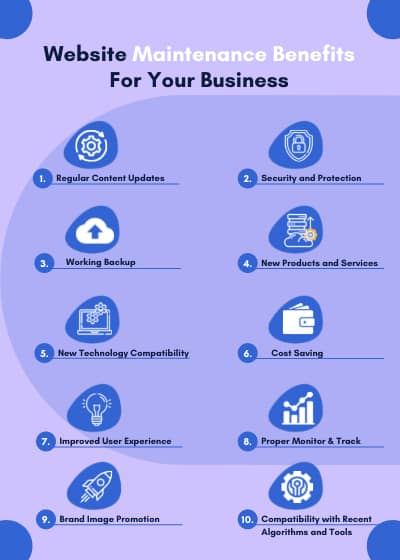
Maintenance Cost Vs. Loss From Downtime
Many businesses think maintenance is expensive. But compare the cost of regular maintenance with the loss from just one day of your website being down:
| Scenario | Monthly Cost (BDT) | Potential Loss (1 Day Downtime) |
|---|---|---|
| Regular Maintenance | 3,000 | 0 |
| No Maintenance | 0 | 10,000+ |
Expanded Explanation: If your website is your main way to get sales or leads, even one hour of downtime during business hours can cost you many clients. If your site is hacked, you may lose days of business and spend more money on urgent repairs.
Expert Advice: Think of maintenance like regular health check-ups. Small monthly costs prevent bigger problems and expenses later.
Extra Insight: Downtime not only costs sales but also damages your Google ranking and reputation, which can take months to fix.
International Standards: Stay Ahead In The Global Market
International clients check your website for:
- Speed and reliability
- Security certifications (SSL, HTTPS)
- Regular updates and fresh content
- GDPR or other compliance
One Stop IT Solutions follows global best practices to keep your site competitive worldwide. To learn more about international web standards, visit this [Wikipedia resource](https://en.wikipedia.org/wiki/Web_content_accessibility_guidelines).
Expanded Explanation: Meeting international standards opens doors to more clients and bigger contracts. Many companies require you to follow accessibility rules (so people with disabilities can use your site), have data protection policies, and show security badges.
Practical Steps:
- We install and renew SSL certificates so your site is always “secure.”
- We set up privacy policy and cookie consent banners.
- We test and fix accessibility issues (color contrast, alt text for images, keyboard navigation).
Non-obvious Insight: Some international payment gateways or business partners will not work with your site if you do not meet these standards.
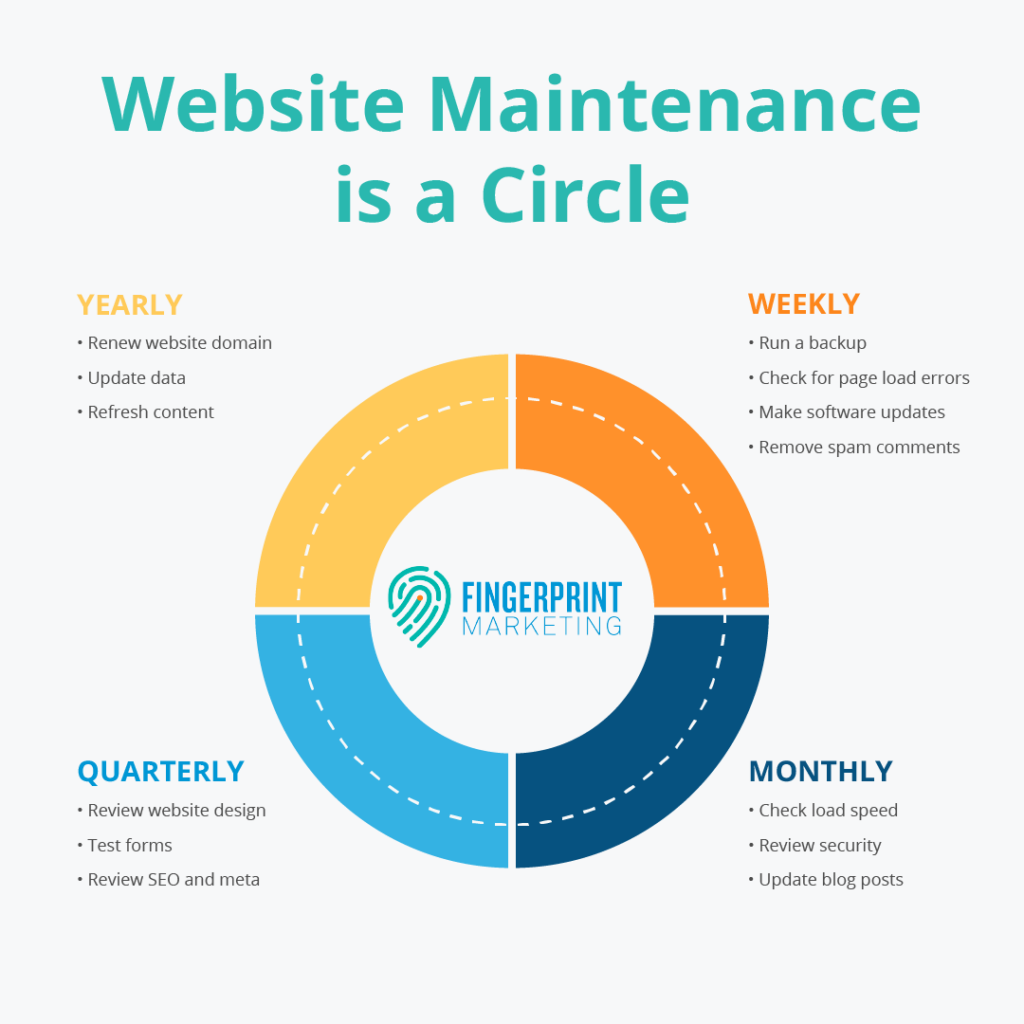
How To Start With Website Maintenance
- Review your current website—look for slow pages, errors, or old content.
- Make a list of things to update or fix.
- Set up automatic backups.
- Schedule regular checks (monthly is good for most businesses).
- Talk to a professional team like One Stop IT Solutions.
Expanded Steps:
- Use free tools like Google Search Console to check for errors.
- Update your “About Us” and “Contact” pages with current information.
- Review your main service or product pages to ensure all details are correct.
- If you’re not sure what to fix, ask for a professional website audit.
Expert Tip: Start small. Even basic maintenance (like updates and backups) is better than doing nothing.
Frequently Asked Questions
What Is Included In Website Maintenance?
Website maintenance includes software updates, content updates, backups, security checks, speed optimization, fixing broken links, and checking if the site works on all devices. It also means monitoring your website so problems are fixed quickly.
Expanded Answer: Advanced maintenance can include SEO improvements, adding new features, managing emails, and making your site accessible for people with disabilities.
How Often Should I Maintain My Website?
Most businesses should check and update their website at least once a month. Some tasks, like backups or security checks, should be done weekly or daily if your website is very active.
Non-obvious Insight: If you run an e-commerce or news site, daily checks are best. For small business sites, monthly is usually enough, but security updates should never wait.
Can I Do Website Maintenance Myself?
If you have technical knowledge, you can do basic maintenance tasks. But for best results, and to avoid mistakes, it’s better to hire experts like One Stop IT Solutions.
Expanded Answer: Common mistakes by DIY maintenance include missing important updates, not setting up backups properly, or breaking the site by updating incompatible plugins.
How Does Website Maintenance Improve Seo?
Google prefers websites that are fast, secure, and up to date. Regular maintenance fixes errors, improves speed, and adds new content. All these help you rank higher in search results.
Practical Example: Fixing broken links, updating meta tags, and cleaning up old content are all part of SEO-focused maintenance.
How Much Does Website Maintenance Cost In Bangladesh?
Costs can start from a few thousand BDT per month, depending on your website size and needs. One Stop IT Solutions offers affordable packages for all types of businesses.
Expert Tip: Compare what’s included in different packages (updates, backups, support) before choosing a provider.
—
A well-maintained website brings more clients, protects your data, and builds your brand. Don’t let your business suffer because of website problems. Trust experts who know the Bangladeshi and international market. For affordable, expert website maintenance, contact One Stop IT Solutions today.
👉 Website: [onestopitbd.com](https://darkblue-curlew-445621.hostingersite.com)
👉 Email: Contact@darkblue-curlew-445621.hostingersite.com
👉 Whatsapp: +8801914119584
Let Us Help You Grow Your Business Safely And Professionally!
