Businesses use custom AI agents to automate customer support and sales by scanning databases and responding to user inputs in real-time. These systems replace manual ticket sorting and basic lead qualification with automated, logic-based interactions.
The effectiveness of these agents depends on the quality of the data they process and the complexity of the rules programmed into their core. If your business has structured FAQs, you’ll see high automation rates; if your sales process relies on complex human negotiation, you’ll need to limit the agent to initial lead filtering.
Steps to automate customer support and sales with custom agents
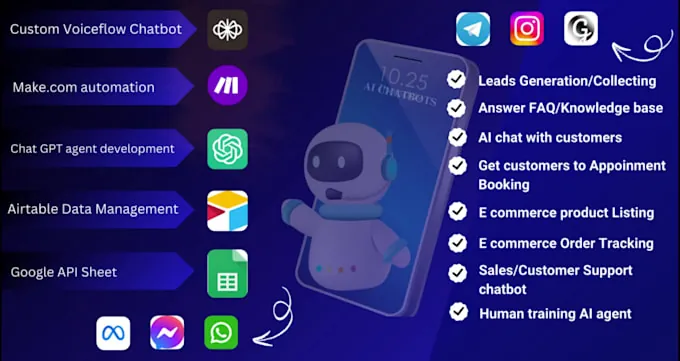
If you run a business with high inquiry volumes, you start by mapping your most frequent customer questions. Many companies find that 60% to 80% of support tickets are repetitive, such as status checks or password resets. By programming an agent to pull this data directly from your internal One Stop IT Solutions systems, you reduce the time your team spends on administrative tasks.
You first identify the “happy path”—the ideal conversation flow for a customer. You then build a decision tree where the agent asks clarifying questions before offering a solution or escalating to a human staff member. This ensures the agent doesn’t guess answers when the logic is unclear.
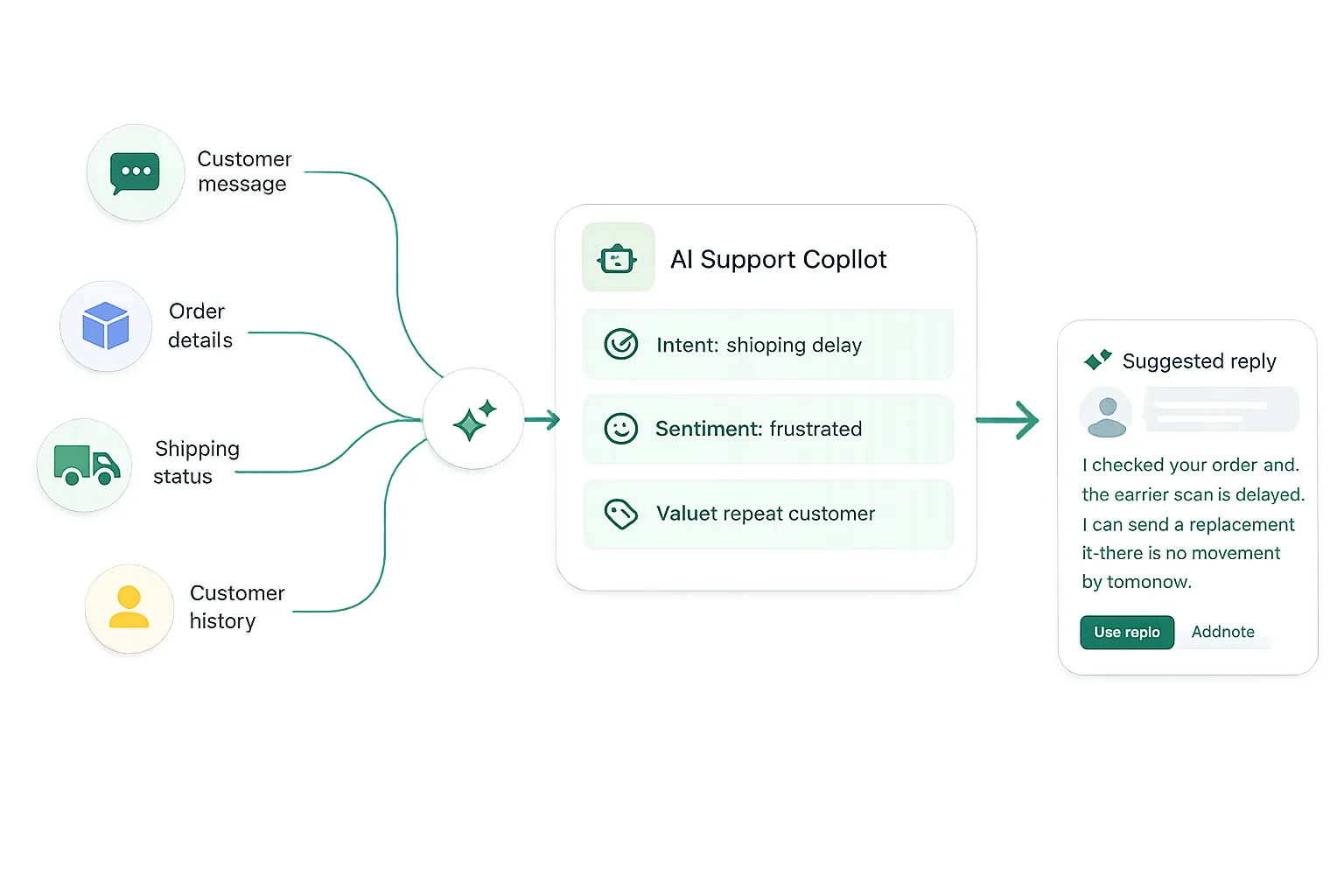
The final result is a system that works 24/7. When a customer sends a message, the agent identifies the intent, retrieves the necessary record, and provides an immediate response. You monitor the logs weekly to adjust the agent’s responses based on new types of questions that appear.
Factors that determine automation success
The accuracy of your agent relies heavily on the quality of your knowledge base. If your documentation is outdated or incomplete, the agent will provide incorrect information to customers. You should review your source files every quarter to ensure the agent reflects your current policies.
System integration complexity changes how fast you can launch. A simple chat agent linked to a public FAQ page can go live in days, while an agent connected to a private CRM requires careful mapping of API endpoints. Always start with a closed scope to avoid data leaks.
The volume of traffic dictates your infrastructure needs. If you have thousands of daily users, you need a scalable cloud environment to ensure low latency. For lower volumes, standard hosting is usually sufficient, but you must check your server logs to ensure the agent handles concurrent requests without crashing.
Most people underestimate the need for human oversight. You must set up an alert system that triggers a notification for your team whenever the agent fails to resolve a query. This prevents frustrated customers from being stuck in a loop without help.
Steps for deploying your ai agent
- Audit your support logs to find the top ten recurring questions.
- Draft clear, concise answers for each of these questions in a spreadsheet.
- Choose a development platform that supports secure API connections to your database.
- Program the agent to check user identity before sharing sensitive account details.
- Create a “fallback” protocol that routes the user to a human agent immediately.
- Run a pilot test with a small group of users to track response accuracy.
- Review the logs for errors and update the agent’s logic accordingly.
- Deploy the agent to your live website with a clear “Powered by AI” label.
A successful deployment hinges on the transition point between the agent and your staff. If the handover is smooth, the customer feels supported; if the transition is clunky, the customer loses patience. You must test the “escalation trigger” until it works perfectly in every scenario.
Comparison of agent capabilities
| Situation | Strategy | Effort | Key Metric |
|---|---|---|---|
| Simple FAQs | Rule-based logic | Low | Resolution rate |
| Order tracking | Database lookup | Medium | Response time |
| Lead qualification | Form integration | Medium | Conversion rate |
| Technical support | Knowledge base | High | Ticket deflection |
| Custom sales | Predictive modeling | High | Close rate |
Rule-based logic is ideal for static queries where the answer never changes. It functions like a digital flowchart, guiding users to pre-written responses. This approach works best for company policies or store hours because it eliminates the risk of hallucinations. You don’t need complex training data here, just a clean, mapped decision tree.
Database lookups bridge the gap between your agent and your live backend systems. When a customer asks for an order status, the agent pulls real-time information directly from your shipping provider. This matters because it provides instant, accurate transparency. Without this integration, the agent remains a static information kiosk rather than a functional tool.
Form integration turns your agent into an active sales funnel. By connecting the chat interface to your CRM, the agent captures contact details and intent signals automatically. This allows your sales team to prioritize high-value leads immediately. The goal is to move the user from a casual inquiry to a qualified prospect without manual data entry.
Knowledge base retrieval is the engine behind complex technical support. The agent scans your documentation to synthesize answers for specific error codes or troubleshooting steps. This works best when your internal guides are structured clearly. If your documentation is fragmented, the agent will struggle to provide coherent instructions.
Predictive modeling represents the highest tier of agent capability. By analyzing past successful sales cycles, the agent suggests products or pricing structures tailored to the individual. This isn’t just answering questions; it’s actively steering the conversation toward a purchase. It requires significant historical data to be effective, but it turns your support channel into a primary revenue driver.
Improving agent performance and accuracy

Refining the knowledge base
Experienced teams treat the agent as a living document. They update the agent’s source material every time a product changes or a policy is revised. If you fail to keep the database current, the agent will confidently provide wrong information, which damages your brand reputation.
Monitoring interaction logs
Beginners often set up the agent and forget about it. Proactive teams review the chat transcripts to see where customers get stuck or ask questions the agent can’t answer. They use these gaps to build new logic branches that make the agent more useful over time.
Solving common automation errors
| What you notice | What it usually means | What to do first | How to stop it |
|---|---|---|---|
| Agent loops | Logic error | Reset conversation | Simplify decision tree |
| Wrong answers | Bad source data | Update knowledge base | Audit source files |
| Slow responses | Server lag | Check API speed | Optimize database query |
| No escalation | Missing trigger | Add human handoff | Set error threshold |
| High bounce | Poor greeting | Rewrite intro text | Test A/B messaging |
Regulatory and compliance rules
When using agents to handle data, you must follow local privacy laws. In many regions, you’re legally required to inform users they’re interacting with an AI rather than a human. Check your local data protection authority guidelines, such as those provided by the Information Commissioner’s Office regarding automated decision-making and transparency.
Transparency mandates often require more than a simple disclaimer. Your agent should proactively state its identity at the beginning of every conversation. This ensures users understand the nature of the interaction before they disclose personal details. If the agent can’t answer a query, it must provide a clear path to human escalation.
You must also ensure that the agent doesn’t store sensitive payment information in plain text. Always use encrypted storage for user identifiers. Relying on standard database security is rarely sufficient for AI logs. You should implement tokenization for any credit card or banking data processed during a sale. This prevents your AI logs from becoming a liability if your systems are ever breached.
Data minimization is your strongest defense against compliance audits. Configure your agent to strip or mask personally identifiable information from interaction logs immediately after the session ends. If a customer provides an email address or phone number, ensure the system moves this data to a secure CRM rather than keeping it in the chat history.
Retention policies must be strictly enforced. Automated agents often generate massive volumes of logs that contain sensitive snippets. You should set an expiration date for these records based on your industry requirements. Regularly purge logs that are no longer necessary for performance tuning.
If you’re unsure about your legal requirements, consult with a local IT consultant who understands data security standards in your specific region. Compliance isn’t a one-time setup. As your agent learns and evolves, you must conduct periodic audits to ensure its decision-making logic remains aligned with current regional regulations and internal privacy mandates.
Managing the operational costs
Building and maintaining an agent involves more than just the initial development fee. You’ll face ongoing costs for cloud hosting, API usage, and the time spent monitoring logs. These costs vary based on the number of messages your agent processes each month.
If your volume is low, you might pay only for the tools used. For high-traffic sites, you should expect a monthly subscription fee for the AI service provider. Always ask for a clear breakdown of pricing based on your expected monthly interaction count before signing any long-term service agreements.
Beyond these baseline expenses, consider the hidden cost of token consumption. Most language models charge per token, which includes both the input prompt and the generated response. Lengthy customer conversations or complex troubleshooting requests consume significantly more tokens than simple status inquiries. If your agent frequently handles multi-turn dialogues, these costs can scale rapidly during peak business hours.
You must also account for the cost of data storage and retrieval. As your knowledge base grows, the vector database hosting your documentation will require more memory and compute power. This is often an overlooked line item that scales linearly with the complexity of your support documentation.
When forecasting your budget, build in a buffer for unexpected spikes in traffic. Marketing campaigns or seasonal demand shifts can trigger a sudden surge in agent activity, potentially pushing you into a higher, more expensive tier of service.
Finally, weigh the cost of human oversight against the cost of automation. While an agent reduces the need for manual ticket entry, it requires periodic human review to ensure quality. Factor in the hourly rate of the staff member tasked with auditing these interactions. If the cost of auditing exceeds the savings generated by the agent, you may need to simplify the agent’s scope to focus on high-volume, low-complexity tasks.
Maintaining your agent over time
The agent requires regular maintenance to stay effective. You should perform a monthly health check to ensure all links to your product pages and policy documents are still active. If your website structure changes, the agent may lose access to these resources.
Think of your agent as a living document rather than a static tool. Every time your marketing team updates a landing page or your legal department revises a warranty term, the agent’s internal map of your business becomes slightly misaligned. Schedule these audits alongside your routine site updates to prevent the AI from serving outdated information to high-intent leads.
Watch for the “frustration sign” in customer logs, such as repeated requests for a human or angry language. When you see these patterns, it’s time to refine your agent’s responses. These signals often indicate that the AI is stuck in a loop or failing to interpret the nuance of a specific customer complaint.
You can often solve these issues by adding a “Talk to a person” button to the chat window. This serves as a vital safety valve, ensuring that a customer’s negative experience doesn’t escalate into a lost sale or a damaged brand reputation.
When you notice a recurring failure point, test the agent yourself using the exact phrasing that caused the frustration. If the AI provides a circular answer, you likely need to simplify the source text in your knowledge base.
Sometimes, the agent is technically correct but functionally unhelpful. In these cases, rewrite the response to prioritize empathy over raw data. By treating these friction points as diagnostic data, you turn every failed interaction into a roadmap for a more capable, reliable, and helpful sales tool.
When to avoid ai automation
Sometimes, an AI agent is the wrong tool for your needs. If your business focuses on high-touch, luxury consulting, a robotic response can feel cold and impersonal to your clients. In these cases, a human-only support model is better for maintaining your brand’s premium image.
When a customer initiates contact during a crisis or a highly emotional situation, they seek validation and human connection. An AI, no matter how well-trained, often sounds dismissive or scripted during these critical moments. Relying on automation here risks damaging the trust you have spent years building with your clientele.
If your product is highly technical and requires deep, nuanced troubleshooting, an AI may struggle to provide the correct fix. Don’t force automation where it creates more work for your customers. Use human experts when the problem requires empathy or complex judgment calls that an AI can’t simulate.
Consider the complexity of your typical support tickets. If your agents frequently handle unique, one-off scenarios that lack historical data or clear patterns, automation will likely fail. In these instances, the AI will either provide a generic, unhelpful answer or hallucinate a solution that leads to further frustration.
You should also avoid automation when your internal knowledge base is fragmented or outdated. An AI is only as reliable as the information it’s fed. If your team can’t provide a clean, structured source of truth, the agent will inevitably propagate errors.
Finally, evaluate your current customer journey. If your primary goal is to foster deep, long-term relationships through personalized outreach, prioritize human interaction. Automation is a tool for efficiency, not a replacement for the human touch that defines your brand. When the cost of a single error outweighs the time saved by a bot, keep a human in the loop.
Related guides
Frequently asked questions
Can ai agents handle payments?
Yes, but they must connect to a secure payment gateway. The agent should guide the user to a secure payment link rather than collecting card details directly in the chat window to ensure compliance with security standards.
How long does deployment take?
A basic agent usually takes two to four weeks to build and test. The timeline depends on how cleanly your data is organized and how many internal systems the agent needs to connect to for real-time information.
Is it safe to use ai for sales?
It’s safe if you set strict boundaries on what the agent can promise. You must program the agent to avoid making unauthorized guarantees or price changes that could create legal liabilities for your company.
What happens if the ai makes a mistake?
The agent should be programmed to apologize and escalate the issue to a human supervisor immediately. You should have a clear process for correcting these errors and updating the agent’s logic to prevent repetition.
Does it matter which ai platform I use?
Yes, because not all platforms offer the same level of security and integration flexibility. You should choose a provider that aligns with your existing technology stack and offers robust support for your specific business needs.
How do I know if the agent is working?
You track the “deflection rate,” which is the percentage of queries the agent solves without human help. You should also monitor customer satisfaction scores specifically for automated interactions to ensure users are happy with the service.
Conclusion
Start by auditing your support inbox to find the most common questions your team answers every day. Once you have that list, you can build a simple agent to handle those specific tasks, which will immediately free up time for your team to focus on complex sales. If you need help identifying where to start, you can reach out to One Stop IT Solutions to discuss your business needs.