
In today’s fast-moving business world, customers want easy and secure online payments. If your website does not have a payment system, you are losing many sales—both in Bangladesh and worldwide. Many business owners feel confused when they hear about payment gateway integration. They think it is hard, expensive, or risky.
But the good news is, with the right help and steps, any business can add a payment gateway quickly and safely. This guide will show you the simple way to integrate a payment gateway on your website—even if you are not a tech expert. We will also discuss real examples, tips, and why working with a trusted partner like One Stop IT Solutions makes all the difference.
Understanding the details will empower you to make smart choices. You will learn how payment gateways work, what to watch out for, and how to avoid common problems. Whether you run a small shop, a large online store, or a service business, this article will help you get started and succeed.
—
What Is A Payment Gateway?
A payment gateway is a secure online service that connects your website to your bank or mobile wallet. When a customer wants to pay, the gateway checks the card or mobile wallet, makes sure the payment is safe, and then completes the sale.
Think of it like a digital cash register for your website. Customers enter their card or mobile wallet details, and the payment gateway does the rest. It checks if the information is correct, if there are enough funds, and if the transaction is safe.
If everything is fine, it moves the money from the customer to your business bank account.
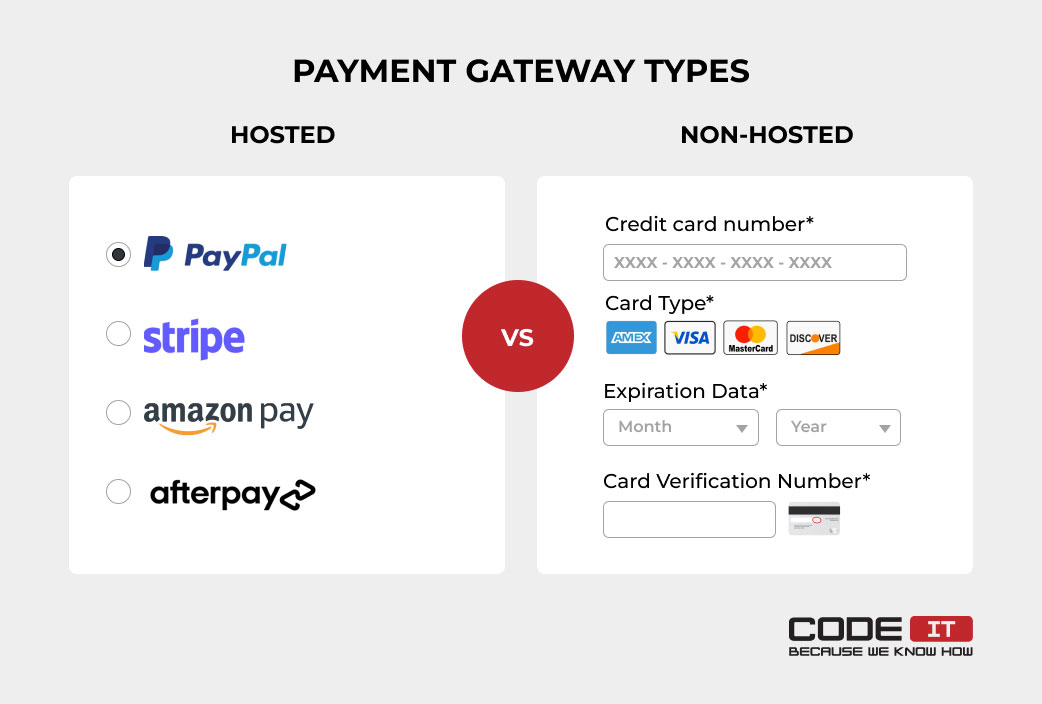
Popular gateways in Bangladesh:
- SSLCOMMERZ
- ShurjoPay
- BKash
- Nagad
- Stripe (for international payments)
- PayPal (for international clients)
Let’s look at a simple example. Imagine your customer wants to buy a shirt from your website. They pick the shirt, add it to their cart, and go to checkout. When they pay, the payment gateway:
- Checks the card or wallet details
- Makes sure everything is safe
- Tells your website the payment is done
- Sends money to your account in a few days
Non-obvious insight: Many people think payment gateways only work with cards, but in Bangladesh, they also support popular mobile wallets like bKash and Nagad. This means you can reach customers who do not use credit cards.
Another key point: Payment gateways do more than just move money. They also help prevent fraud, keep your customer’s information safe, and give you reports on your sales.
—
Why Your Website Needs A Payment Gateway
For Bangladeshi Businesses
Bangladesh’s e-commerce market is growing fast. More people use their phones and computers to buy products and services. If your website does not accept online payments, you lose many local customers.
- Faster payments: No need to wait for cash or bank transfers. Payments happen instantly, so you get your money faster. This is important for cash flow, especially for small businesses.
- Build trust: Customers feel safe when you use a trusted gateway. Showing well-known logos (like bKash, SSLCOMMERZ, or Visa) makes people more likely to buy.
- Grow sales: Offer card, mobile, and international payments. More options mean more customers can pay in the way they like.
Detailed explanation:
Customers today expect to pay online. If you only offer cash on delivery, some people may not order from you. Also, handling cash is risky and takes more time. With a payment gateway, you reduce mistakes, save time, and give better service.
Example: A boutique in Chittagong added bKash and card payments to their website. In just one month, their sales increased by 40%. Many new customers said they chose the boutique because they could pay online.
For International Clients
If you want to sell outside Bangladesh, you must accept international cards or wallets. A payment gateway helps you do this safely and legally.
- Currency conversion: Get paid in different currencies. The gateway handles exchange rates, so you receive the correct amount in your local bank account.
- Global reach: Sell to anyone, anywhere. You are not limited to just Bangladesh.
- Easy refunds: Handle customer service smoothly. If a customer is unhappy, you can send money back easily through the gateway.
Additional insight: Some international clients want to pay by PayPal or Stripe because these services are trusted worldwide. If your website does not offer these options, you may lose international deals.
Practical example: A small software company in Dhaka started selling digital tools to clients in the US and UK. By using Stripe for payments, they made it easy for clients to pay with credit cards. This helped them grow from a local business to an international one.
—

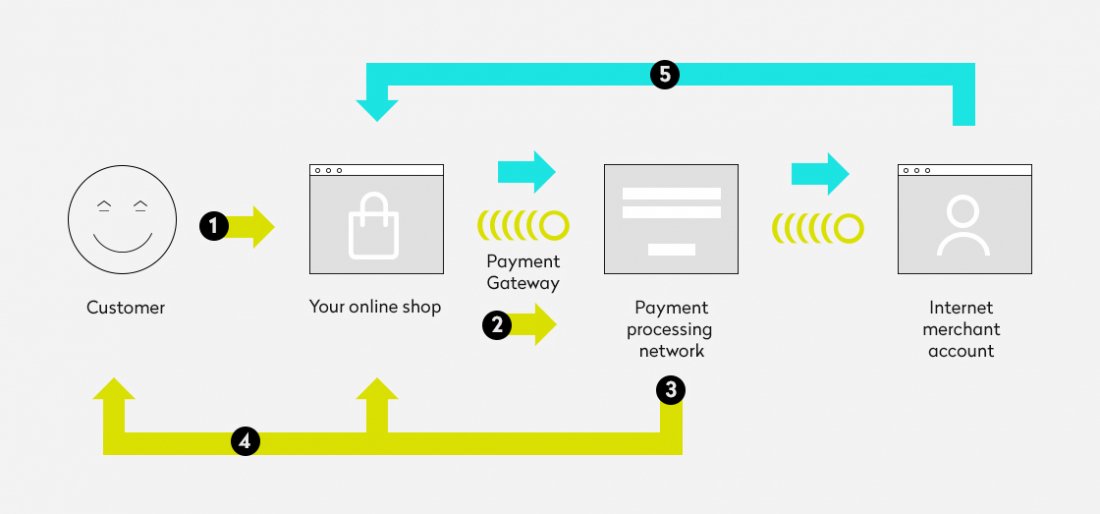
How Does Payment Gateway Integration Work?
When a customer clicks “Pay Now” on your site:
- The payment details go to the payment gateway.
- The gateway checks with the bank or wallet (is there enough money? Is the card real? ).
- If all is good, the payment goes through. Both you and the customer get a message.
- The money goes to your account, usually within 1–3 days.
Deeper explanation:
The process may look simple, but there are many steps happening in the background. The payment gateway talks to the customer’s bank, your bank, and sometimes other systems. It checks for fraud, verifies details, and keeps the data safe.
Security is key: All data is encrypted (safe from hackers). That is why you should use a trusted gateway, not build your own.
What does “encrypted” mean? It means the payment details (like card number or wallet info) are changed into a secret code that hackers cannot read. Only the gateway and the bank can understand it.
Example of what happens if something goes wrong:
If the card has no money or is blocked, the gateway will reject the payment. The customer will see a message and can try a different method.
Non-obvious insight: Some gateways offer “fraud detection” tools. These tools can spot fake or risky payments and stop them before they cause trouble. This protects your business from chargebacks and losses.
Second insight: Payment gateways can also help with accounting. They give you reports and summaries, making it easier to track your sales and manage your taxes.
—
Choosing The Right Payment Gateway
Not all gateways are the same. Think about these points:
1. Supported Payment Methods
Some gateways support bKash, Nagad, cards, and more. Others are only for cards. Choose one that fits your customers.
Example:
If your main customers use bKash, you must choose a gateway that offers bKash payments. If you ignore this, you will lose many sales.
Extra tip: Ask your existing customers how they prefer to pay. Sometimes, adding a mobile wallet option can double your online sales.
2. Local And International Support
If you want to sell outside Bangladesh, pick a gateway that supports Visa, MasterCard, and PayPal/Stripe.
Why it matters: Some gateways only work inside Bangladesh. If you want to grow, you need a solution that works globally.
Example:
A fashion store in Dhaka wanted to sell to the UK. They chose Stripe because it accepts international cards and supports payment in British Pounds.
3. Fees And Charges
Each gateway charges a small fee per transaction. Compare before you decide.
Here is a comparison of popular gateways and their fees:
| Gateway Name | Local Payment Support | International Cards | Typical Fee (%) |
|---|---|---|---|
| SSLCOMMERZ | Yes | Yes | 2.5-3.5% |
| bKash Payment | Yes | No | 1.5-2.5% |
| Stripe | No | Yes | 2.9% + 30¢ |
Practical advice:
- If you have many small payments, watch out for fixed fees (like 30 cents per payment).
- Some gateways charge extra for refunds or chargebacks.
Non-obvious insight:
Some gateways have hidden costs, like monthly fees or setup charges. Always ask for the full fee structure before signing up.
4. Security
Choose gateways that offer PCI DSS compliance (international security standard) and two-factor authentication.
- PCI DSS means your customers’ card data is handled safely.
- Two-factor authentication adds an extra layer of safety.
Example:
A gateway without proper security can be hacked, putting your business and customers at risk. Always pick a provider with strong security features.
5. Easy Integration
Some gateways have simple plugins for WordPress, WooCommerce, Shopify, etc. Others need custom coding. Ask your developer or IT partner what is best for you.
Case:
A small online shop used the official WooCommerce plugin for SSLCOMMERZ and was able to go live in one day. A custom-built website needed more time and a developer’s help.
Extra tip:
If you do not have a developer, choose a gateway with plugins and easy setup.
6. Good Support
If there is a problem, you need quick help. Check reviews before you decide.
- Good support can save you time and money.
- Look for gateways with local support in Bangladesh.
Example:
A business faced a technical problem during a big sale. Their gateway support helped them fix it in 30 minutes, saving the sale and keeping customers happy.
Second insight:
Some gateways offer 24/7 support, while others only work during office hours. This can be important if you sell products at night or to customers in other countries.
—
Steps To Integrate A Payment Gateway In Your Website
Let’s make it simple. Here is what you need to do:
Step 1: Choose Your Payment Gateway
Decide which gateway fits your business (local, international, or both). For most Bangladeshi businesses, SSLCOMMERZ or bKash is a good start.
How to choose:
- If you mostly sell in Bangladesh, SSLCOMMERZ, ShurjoPay, or bKash are best.
- For international sales, consider Stripe, 2Checkout, or PayPal.
Tip:
Write down your needs (local/international, card/wallet, plugin/custom) before choosing.
Step 2: Sign Up And Complete Kyc
You need to open a merchant account with the gateway provider. They will ask for your business documents, trade license, bank info, NID, etc. This is for security and legal reasons.
Detailed steps:
- Go to the gateway’s website and click “Sign Up” or “Register.”
- Fill out your business name, contact details, and website URL.
- Upload scanned copies of your trade license, NID, and bank statement.
- Wait for the gateway team to review your application. This can take 1–5 days.
- Sometimes, they will call you to verify details.
Non-obvious insight:
If your business papers are not ready, you cannot open a merchant account. Make sure your documents are correct and up-to-date.
Step 3: Get Api Keys Or Plugin
- For WordPress or Shopify: Download the official plugin, then follow setup steps.
- For custom websites: The provider will give you API keys (special codes for secure connection).
What is an API key?
It is a long string of letters and numbers that connects your website to the payment gateway. It is like a password, so keep it safe.
Practical example:
If you use WooCommerce, search for “SSLCOMMERZ payment plugin” in the plugin store. Install it, enter your API keys, and you are ready to go.
Warning:
Never share your API keys in public or over email. Hackers can use them to steal money.
Step 4: Integration
Option 1: Use a Plugin
- Install the plugin
- Enter your API keys
- Test with a small payment
Option 2: Custom Integration
If you have a unique website, you need a developer to connect the gateway using the API.
Sample code snippet (for developers):
// Example: SSLCOMMERZ API integration in PHP
$api_url = 'https://sandbox.sslcommerz.com/gwprocess/v4/api.php';
$data = array(
'store_id' => 'your_store_id',
'store_passwd' => 'your_password',
'total_amount' => '500',
'currency' => 'BDT',
// ...other required fields
);
// Send data using cURL or similar method
Extra tip:
Most gateways have developer documentation. Share it with your web developer. Always test in “sandbox” mode first.
Step 5: Test Everything
Never Go Live Without Testing!
- Make test payments (gateway will give test cards or mobile numbers).
- Check what happens if payment fails.
- Check emails and SMS notifications.
Why test?
Testing helps you find problems before real customers pay. For example, maybe your site does not show the right message if a payment fails. Fix these before launch.
Non-obvious insight:
Test with different payment methods (bKash, card, Nagad) and different devices (mobile, desktop).
Step 6: Go Live
Once you are happy, switch from sandbox (test mode) to live mode. Now, real payments will go to your bank.
What is “live mode”?
It means your website is ready to accept real money from customers.
Tip:
Do a small real payment first to make sure everything works.
Step 7: Monitor And Support
- Check your dashboard for new payments.
- Handle refunds, failed payments, or disputes quickly.
- Keep software and plugins updated for security.
Why monitor?
Problems can happen—maybe a payment fails, or a customer asks for a refund. If you do not check your dashboard, you may miss these issues.
Second insight:
Set up email or SMS alerts for new payments, so you know when money arrives.
—
Real-world Example: Small Business In Dhaka
Rahim Traders sells electronics in Dhaka and wants to take orders online. They choose SSLCOMMERZ. Here’s what they do:
- Contact SSLCOMMERZ and open a merchant account.
- Share business papers and bank details.
- Their web developer uses the free WooCommerce plugin.
- They add bKash, Nagad, and card support.
- Test payments work well, so they launch their online shop.
- Sales increase, and customers feel safe paying online.
More detail:
Before integration, Rahim Traders only accepted cash on delivery. This meant many customers changed their minds or did not pay. After adding online payments, they noticed:
- Fewer canceled orders
- More sales from outside Dhaka (because people trust online payments)
- Easier accounting, because all payments are tracked
They also saw new customers from Chattogram and Sylhet, who said they would not have bought if online payment was not available.
Common beginner mistake:
Rahim Traders first forgot to test failed payment scenarios. Some customers had trouble when their card was declined. After feedback, they added better messages and support, which improved customer satisfaction.
Lesson:
Testing and listening to customer feedback helped Rahim Traders avoid bigger problems and boost their business.
—
Practical Tips For Payment Gateway Success
- Always use HTTPS: Your website must have SSL (padlock symbol) for secure payments.
- Display payment options: Show bKash, card, and other logos so customers know what you accept.
- Clear refund policy: Explain your refund rules on your website.
- Update regularly: Keep your plugins, themes, and gateway integration updated for security.
- Monitor payments daily: Catch failed or suspicious payments early.
More details and examples:
- HTTPS/SSL:
If your website does not use HTTPS, browsers may show a “Not Secure” warning. This can scare customers away. Ask your hosting company to install a free SSL certificate.
- Display payment options:
Customers trust websites that show familiar payment logos. Place these at the bottom of your homepage and on the checkout page.
- Refund policy:
A clear refund policy builds trust. For example: “If you are not happy with your product, we offer a full refund within 7 days.” Add this to your FAQ or checkout page.
- Update plugins/software:
Old plugins can have security holes. Set a reminder to check for updates every month. If you do not update, you risk getting hacked.
- Monitor payments:
Log in to your payment gateway dashboard every morning. Look for failed or blocked payments. This helps you spot problems early and fix them before they grow.
Non-obvious tip:
Some gateways offer “webhooks” or instant alerts when a payment is made. Use these to connect your payment gateway to your order system, so orders are processed instantly.
Second tip:
Train your staff to handle basic payment issues. For example, if a customer says, “My payment failed,” your staff should know how to check the gateway dashboard and help.
—
Payment Gateway Integration For International Markets
If you want to sell to the US, UK, Europe, or other countries, you need a gateway that supports international cards and currencies.
Popular choices:
- Stripe
- 2Checkout
- PayPal
Key points:
- Some gateways need a foreign bank account (or business registration in the US/EU).
- Fees may be higher for international payments.
- You might need to show more documents for KYC.
Example:
An online learning platform in Bangladesh wanted to sell courses to students in the US. They registered a business in the UK and opened a Stripe account. This let them accept payments in USD, GBP, and EUR.
Pro Tip: If you are unsure how to set this up, partner with a local IT company that has experience with international e-commerce.
| Gateway | Bangladeshi Businesses | International Clients | Setup Difficulty |
|---|---|---|---|
| SSLCOMMERZ | Excellent | Good | Easy |
| Stripe | Needs foreign registration | Excellent | Medium |
| PayPal | Not available for receiving in BD | Excellent | Medium |
More detail:
- Stripe: You must have a company registered in a supported country (like the US, UK, Singapore). If you only have a Bangladesh company, Stripe may not work for you.
- PayPal: You can send money from Bangladesh, but you cannot receive money directly into a Bangladeshi bank account. Some businesses solve this by opening a company in another country.
- 2Checkout: Easier for Bangladeshi businesses, but fees are higher.
Non-obvious insight:
International gateways often check your website before approval. Make sure your site looks professional, with a clear privacy policy, refund policy, and contact details.
Second insight:
For international sales, always display prices in local currency (like USD or EUR) and explain if there are any extra bank charges.
—
Why Work With One Stop It Solutions?
Integrating a payment gateway may sound easy, but mistakes can lead to lost payments, security problems, or angry customers. That’s why hundreds of Bangladeshi businesses trust One Stop IT Solutions for this job.
What Makes Us Different?
- Expert team: Years of experience with all major Bangladeshi and international gateways.
- Affordable pricing: Clear packages for small and large businesses.
- Full support: From paperwork to technical setup, we handle everything.
- Fast work: Get your payment system live in days, not weeks.
- Trusted by leading brands: Our clients include top e-commerce sites, retailers, and service companies.
More detail:
We have helped businesses in fashion, electronics, groceries, education, and digital services. We know the common problems and how to solve them quickly.
Example:
A large online bookstore in Dhaka had problems with failed bKash payments. Our team found and fixed the issue in two days, saving the business time and money.
Non-obvious insight:
We also help with paperwork. Many business owners get stuck because they do not have the right documents. Our team checks your papers and guides you step by step.
Second insight:
We help you train your staff to manage the payment system, handle refunds, and solve customer problems. This makes your business more professional.
Whether you need bKash for local sales or Stripe for the US market, we make it stress-free and safe.
Real Feedback
“Our sales doubled after One Stop IT Solutions integrated SSLCOMMERZ and Stripe. Support was always there when we needed help. ”
— Mahfuz Rahman, Ceo, Techmart Bd
More feedback:
“Before working with One Stop IT Solutions, our website payments often failed. Now, customers pay smoothly, and our refunds are automatic. ”
— Shaila Ahmed, Owner, Fashionhub
—
Common Mistakes To Avoid
- Ignoring security: Never use old plugins or share API keys publicly.
- No testing: Test every scenario—failed payments, refunds, etc.
- Hiding fees: Tell customers about any extra charges before they pay.
- Poor customer support: Slow replies can lose sales.
- Choosing the wrong gateway: Always check if the gateway fits your market.
More detail and examples:
- Ignoring security:
One shop used an old plugin, and hackers stole customer card data. The shop lost money and trust. Always update your software and keep API keys safe.
- No testing:
Another business launched without testing refunds. When a customer wanted a refund, the system failed. The business lost the customer and got bad reviews.
- Hiding fees:
If you charge extra for card payments, tell customers before they pay. Surprise fees can make people cancel orders.
- Poor customer support:
A slow response to payment problems can mean lost sales. Train staff to answer payment questions quickly.
- Choosing the wrong gateway:
Some businesses picked gateways that did not support bKash or Nagad, losing local sales. Always match the gateway to your customers.
Non-obvious insight:
Review your payment system every 6 months. Payment technology changes fast, and better options may be available.
—
Payment Gateway Integration: Quick Checklist
- [ ] Choose the right gateway for your market
- [ ] Open a merchant account (KYC done)
- [ ] Get API keys or plugin
- [ ] Integrate and test all payment methods
- [ ] Set up SSL and security
- [ ] Go live and monitor payments
- [ ] Update and support regularly
How to use this checklist:
Print it out and check each item as you go. Do not skip steps—especially testing and security.
Second tip:
Share the checklist with your team so everyone knows what to do.
—
Advanced Tips For Growing Businesses
- Offer one-click payments for repeat buyers.
- Use analytics to track which payment methods are most popular.
- Set up auto-refund for canceled orders.
- Add multi-currency support if selling internationally.
- Combine multiple gateways for backup (if one fails, another works).
More detail and examples:
- One-click payments:
Save returning customers’ payment details (securely) so they can pay with one click. This increases repeat sales.
- Analytics:
Use your payment gateway dashboard or Google Analytics to see which payment methods are used most. If most people use bKash, promote it more on your site.
- Auto-refund:
Set rules so refunds happen automatically for canceled orders. This saves time and builds trust.
- Multi-currency support:
If you sell to other countries, let customers pay in their own currency. This reduces confusion and increases sales.
- Backup gateways:
Sometimes, a gateway has downtime. If you support two gateways (like SSLCOMMERZ and bKash), your business can keep running.
Non-obvious insight:
Some gateways offer loyalty programs or cashback for customers. Use these to attract more buyers.
Second insight:
Integrate your payment gateway with your accounting software to save time on bookkeeping.
—
Useful Resources
If you want to learn more, you can read the official documentation of each gateway or check out this overview on Wikipedia.
Other helpful links:
- SSLCOMMERZ Documentation: [https://developer.sslcommerz.com](https://developer.sslcommerz.com)
- Stripe Guides: [https://stripe.com/docs](https://stripe.com/docs)
- WooCommerce Payment Plugins: [https://woocommerce.com/products/](https://woocommerce.com/products/)
Tip:
Bookmark these links for your developer or IT team.
—
Frequently Asked Questions
What Is The Best Payment Gateway For Bangladeshi Businesses?
For most local businesses, SSLCOMMERZ and ShurjoPay are the best choices. They support bKash, Nagad, card payments, and are trusted by banks and e-commerce sites.
Extra info:
Both offer good support, easy integration, and clear reporting. BKash is best for mobile payments, while SSLCOMMERZ covers both cards and wallets.
Can I Accept Payments From International Customers?
Yes, but you need a gateway that supports international cards (Visa, MasterCard) or wallets (PayPal, Stripe). Some options may require a foreign bank account.
Tip:
Check the rules for each gateway. For example, Stripe needs a business in a supported country.
How Long Does It Take To Integrate A Payment Gateway?
If you use a ready-made plugin, it can take 1–2 days. For custom websites, it may take 3–7 days based on your developer’s experience.
Extra detail:
KYC verification can add a few days, especially if your papers are not ready.
Is Payment Gateway Integration Safe?
Yes, if you use a trusted provider and follow security rules (SSL, PCI DSS, two-factor authentication). Never share your API keys or passwords.
Warning:
Never use unapproved plugins or share sensitive information with outsiders.
How Can One Stop It Solutions Help With Payment Gateway Integration?
We offer end-to-end solutions—from choosing the right gateway, handling legal paperwork, to technical setup and support. Our team works with both local and international businesses.
Extra support:
We also provide training, handle updates, and offer fast support if you have problems.
—
Ready to take your business online and accept payments with confidence?
Contact One Stop IT Solutions—your trusted, affordable, and expert web development & SEO company in Bangladesh.