
If you want your website to rank higher on search engines, mastering on-page SEO is a must. But where do you start?
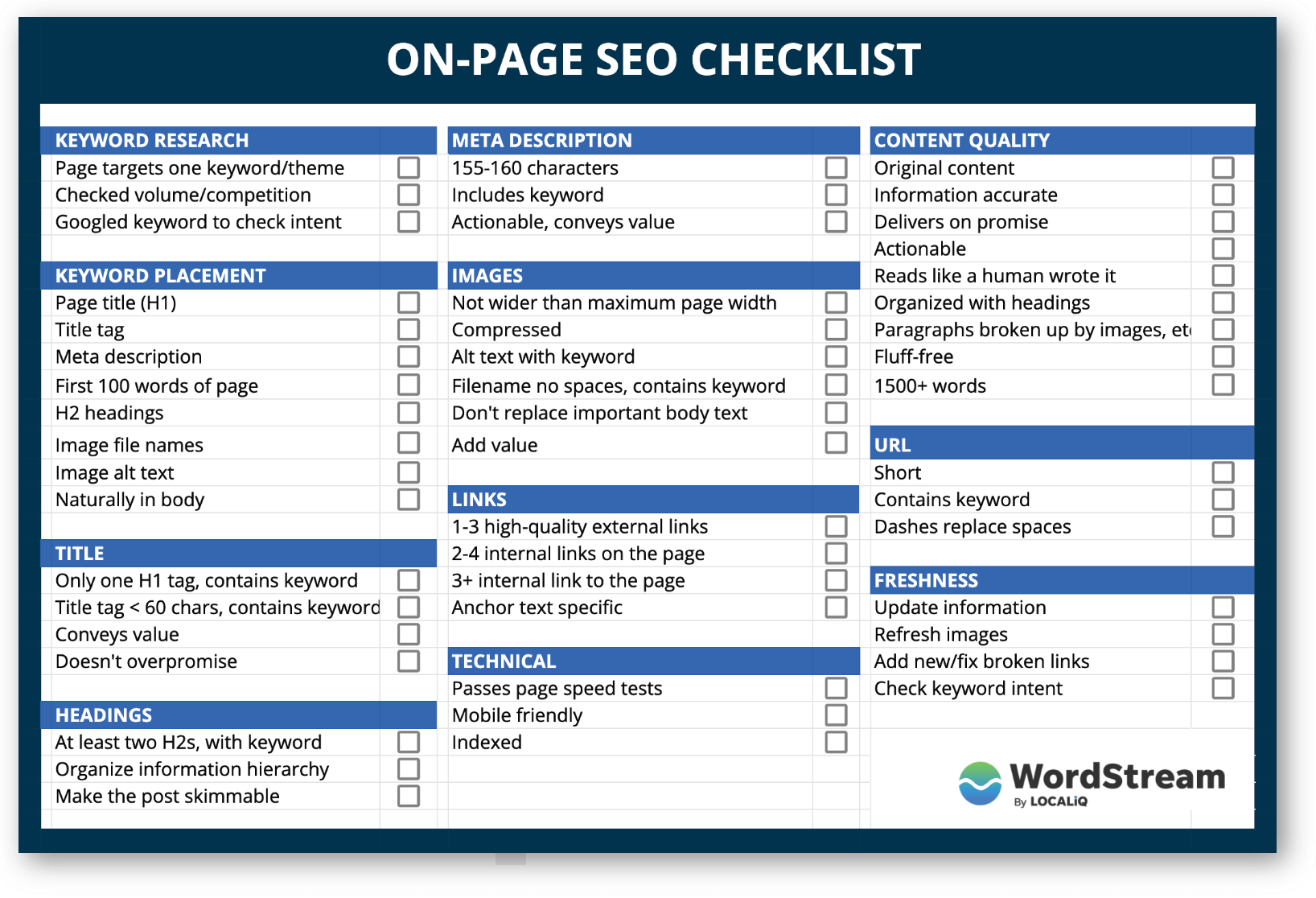
That’s where this On-Page SEO Checklist comes in. It breaks down everything you need to do, step by step, so you don’t miss a thing. By following this simple guide, you’ll unlock the secrets to making your pages more visible and attractive to both Google and your visitors.
Ready to boost your site’s performance and get more traffic? Keep reading—you’re about to discover the key moves that can transform your SEO game.
Keyword Research
Keyword research is the first step to improve your website’s SEO. It helps you find the words people type in search engines. Using the right keywords can bring more visitors to your site. This process guides your content creation and boosts your rankings.
Choosing The Right Keywords
Select keywords that match your content and audience needs. Focus on terms with good search volume but low competition. Think about the words your customers use. Avoid very broad keywords; they are hard to rank for. Aim for clear and specific phrases that show user intent.
Analyzing Competitor Keywords
Look at what keywords your competitors target. This reveals opportunities and gaps in your niche. Use tools to find their top-ranking keywords. Learn which phrases drive traffic to their sites. Use this insight to improve your own keyword list.
Long-tail Keywords Benefits
Long-tail keywords have three or more words. They attract visitors with specific search intent. These keywords face less competition and convert better. They help you reach a targeted audience. Including long-tail keywords increases your chances of ranking higher.
Title Tags
Title tags play a key role in on-page SEO. They tell search engines and users what your page is about. A well-written title tag can increase clicks and improve rankings. Each page needs a unique, clear title tag that reflects its content.
Crafting Effective Titles
Write titles that describe the page clearly. Use simple words that anyone can understand. Make the title interesting to catch attention. Avoid stuffing titles with too many words or complex terms. Keep it natural and relevant to the page content.
Including Target Keywords
Place important keywords near the beginning of the title. This helps search engines recognize your main topic. Use keywords that users often search for. Avoid repeating the same keywords multiple times. Balance keywords with readability for the best results.
Optimizing Title Length
Keep titles between 50 and 60 characters long. Titles that are too long get cut off in search results. Short titles are easier to read and remember. Make sure the full title is visible on most devices. This improves user experience and click rates.
Meta Descriptions
Meta descriptions are small summaries that appear under your page title in search results. They tell users what your page is about. A well-written meta description can attract more visitors and improve your page’s visibility.
Search engines use meta descriptions to understand the content. This helps them decide when to show your page. Crafting clear and relevant meta descriptions is essential for good SEO.
Writing Compelling Descriptions
Create meta descriptions that quickly explain the page’s content. Use simple words to grab attention. Focus on what makes your page useful or unique. Keep descriptions under 160 characters to avoid cut-offs.
Incorporating Keywords Naturally
Include important keywords without stuffing. Place them where they fit smoothly. This helps search engines match your page to relevant searches. Keep sentences clear and easy to read.
Increasing Click-through Rates
A good meta description encourages users to click your link. Use action words like “discover,” “learn,” or “explore.” Highlight benefits or solutions your page offers. Make users curious to visit your site.
Header Tags
Header tags play a key role in organizing your web page content. They help search engines understand the structure and main points. Using header tags correctly improves user experience and SEO. Headers break content into sections, making it easier to read and scan quickly.
Structuring Content With H1 To H6
Use one H1 tag per page to show the main topic. H2 tags divide the page into big sections. Use H3 to H6 for smaller subsections and details. This hierarchy creates a clear content flow. It helps both readers and search engines follow your ideas easily.
Using Keywords In Headers
Include important keywords naturally in headers. This signals what the page is about to search engines. Avoid stuffing keywords; keep headers clear and relevant. Keywords in headers improve your chances of ranking for those terms. They also catch the reader’s attention quickly.
Enhancing Readability
Headers break text into smaller chunks. This makes pages less overwhelming and easier to scan. Use short, simple headers that describe the content below. Clear headers guide readers through your message. They help readers find information fast without confusion.
Url Structure
URL structure plays a key role in on-page SEO. It helps both users and search engines understand the page content. A clear URL structure improves site navigation and boosts rankings. Simple, logical URLs make your website look trustworthy and organized.
Creating Seo-friendly Urls
Create URLs that are easy to read and remember. Use words that describe the page content clearly. Avoid using special characters or long strings of numbers. Use hyphens to separate words for better readability. Clean URLs help search engines index your pages faster.
Using Keywords In Urls
Include main keywords related to the page topic. Keywords in URLs signal the page content to search engines. Avoid stuffing too many keywords; keep it natural and relevant. Use exact match or close variants of your target keyword. This small step can improve your page’s search visibility.
Keeping Urls Short And Descriptive
Short URLs are easier to share and remember. Long URLs can confuse users and look spammy. Make sure URLs clearly describe the page content in a few words. Remove unnecessary words like “and,” “or,” and “the.” A concise URL makes your site look neat and professional.
Content Optimization
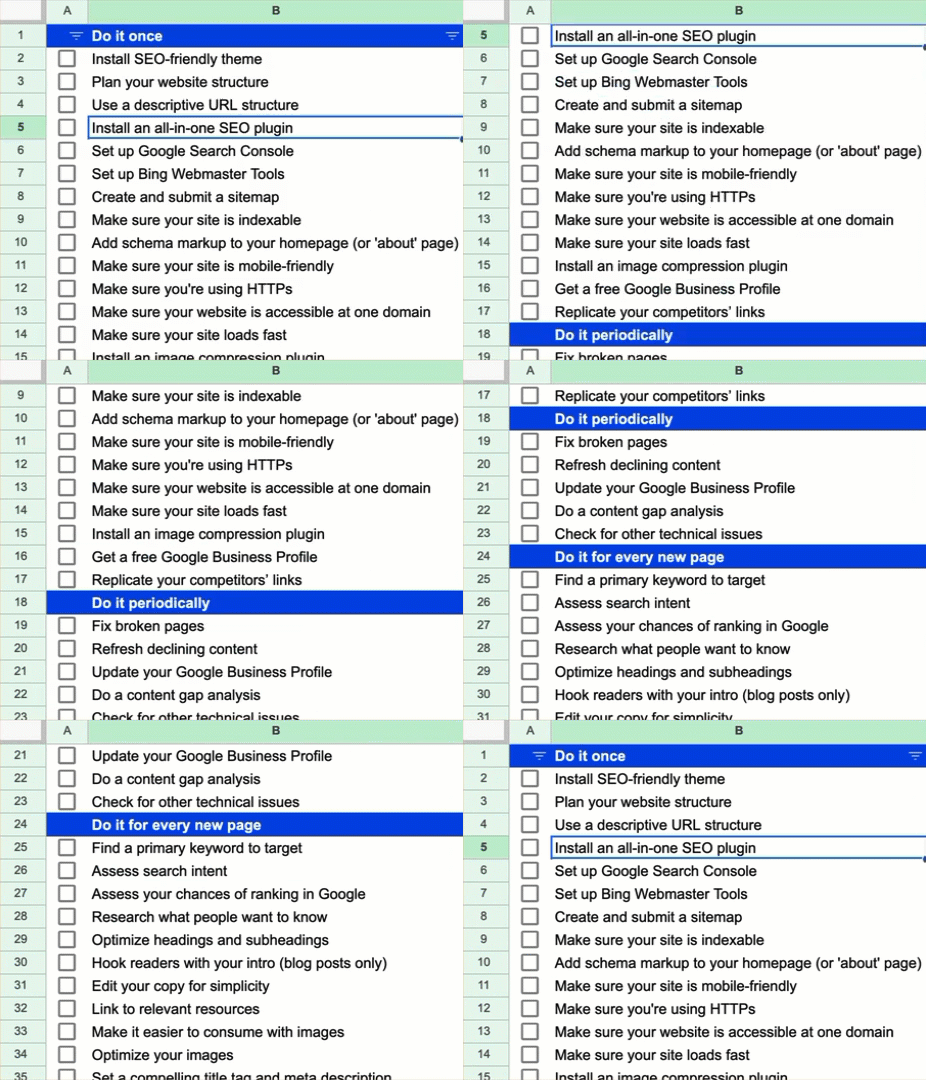
Content optimization is key for strong on-page SEO. It helps search engines understand your page better. It also improves user experience, keeping visitors longer on your site.
Optimized content answers questions clearly. It uses words that people search for. It stays relevant to the topic and matches search intent. This section covers how to optimize your content well.
Writing Quality And Relevant Content
Create content that is useful and easy to read. Use simple words and short sentences. Stay focused on the main topic. Provide clear answers and useful information. Quality content builds trust and keeps readers engaged.
Keyword Placement Strategies
Place important keywords naturally in the text. Use them in titles, headings, and the first paragraph. Include keywords in image alt text and URLs if possible. This helps search engines find and rank your page.
Avoiding Keyword Stuffing
Do not overuse keywords in your content. Too many keywords make text hard to read. It can also cause search engines to lower your ranking. Use synonyms and related terms to keep content natural and smooth.
Internal Linking
Internal linking is a key part of on-page SEO. It connects different pages within your website. This helps search engines understand your site structure. It also guides visitors to find useful information easily.
Effective internal linking improves your website’s user experience. It spreads link authority across pages. This can boost your rankings in search results. Internal links keep users engaged and reduce bounce rates.
Connecting Related Pages
Link pages that share similar topics. This creates a network of relevant content. It helps search engines see how pages relate. Visitors find more information on the same subject. This keeps them on your site longer and encourages exploration.
Using Descriptive Anchor Text
Use clear and specific words for your links. Avoid generic phrases like “click here.” Descriptive anchor text tells users and search engines what the linked page is about. It improves the chances of ranking for targeted keywords. It also makes navigation easier for visitors.
Improving Site Navigation
Internal links create a smooth path through your website. They help users move from one page to another without confusion. Good navigation reduces frustration and keeps visitors interested. Search engines use these links to crawl your site efficiently. This supports better indexing and ranking.
Image Seo
Images are a key part of any webpage. They make content more engaging and easier to understand. Proper image SEO helps search engines find and rank your images. This brings more visitors to your site. Optimizing images also improves page speed, which is important for user experience.
Optimizing Image File Names
Use clear and descriptive file names for your images. Replace spaces with hyphens. Include keywords related to the image and page topic. Avoid generic names like “image1.jpg”. Search engines use file names to understand what the image shows.
Adding Alt Text
Alt text describes images for search engines and users who cannot see them. Write short and clear descriptions. Include relevant keywords naturally. Alt text improves accessibility and helps search engines index your images properly.
Compressing Images For Speed
Large images slow down your website. Compress images to reduce file size without losing quality. Use tools or plugins to optimize images automatically. Faster pages keep visitors engaged and improve your search rankings.
Mobile Optimization
Mobile optimization is a key part of on-page SEO. More people use phones to browse websites than ever before. Search engines favor websites that work well on mobile devices. A mobile-friendly site can improve rankings and keep visitors engaged. Focus on making your site easy to use on all screen sizes.
Ensuring Responsive Design
Responsive design adjusts your website layout to fit any screen size. This means content looks good on phones, tablets, and desktops. Use flexible grids and images that resize automatically. Avoid fixed-width elements that break on small screens. Test your site on different devices to check responsiveness.
Improving Mobile Load Speed
Speed matters more on mobile than desktop. Slow sites frustrate users and increase bounce rates. Optimize images by compressing them without losing quality. Minimize code and use browser caching. Choose a reliable hosting service with fast servers. Fast load times improve both user experience and SEO.
Enhancing User Experience On Mobile
Mobile users need simple navigation and clear buttons. Use large fonts and easy-to-tap links. Avoid pop-ups that cover the screen. Keep forms short and easy to fill out. Make sure important content is visible without zooming. A smooth mobile experience keeps visitors on your site longer.
Page Speed
Page speed is a key factor in SEO and user experience. Fast pages keep visitors happy and reduce bounce rates. Search engines favor websites that load quickly. Improving page speed can boost your rankings and help visitors stay longer.
Minimizing Http Requests
Each element on a page makes a separate HTTP request. Fewer requests mean faster load times. Combine files like CSS and JavaScript to reduce requests. Use CSS sprites for images. This cuts down the number of server calls.
Leveraging Browser Caching
Browser caching stores parts of your site on a user’s device. Returning visitors load pages faster by using cached files. Set expiry dates for static resources. This avoids unnecessary downloads and speeds up repeat visits.
Optimizing Code And Scripts
Clean and simple code loads faster. Remove extra spaces, comments, and unused code. Minify CSS, JavaScript, and HTML files. Defer loading of non-essential scripts to improve initial load speed. Well-optimized code reduces delays and improves performance.
Schema Markup
Schema markup is a type of code you add to your website. It helps search engines understand your content better. This code is called structured data. It explains what your page is about in a clear way.
Using schema markup can improve your site’s visibility. It makes your listings stand out in search results. This can lead to more clicks and visits.
Adding Structured Data
Start by choosing the right schema type. Use tools like Google’s Structured Data Markup Helper. Add the code directly to your HTML or through a plugin. Test the markup with Google’s Rich Results Test tool. Fix any errors before publishing your page.
Enhancing Search Appearance
Schema helps search engines display extra info about your page. This can include ratings, prices, or event dates. Such details attract more attention. They make your listing more useful and trustworthy to users.
Using Rich Snippets
Rich snippets are enhanced search results with extra details. Schema markup enables these snippets to show up. They can include images, stars, or product info. Rich snippets increase your click-through rate. They give users quick answers without clicking your site.
User Engagement
User engagement is a key factor in effective on-page SEO. It shows how visitors interact with your content. Higher engagement signals to search engines that your page is valuable. This can lead to better rankings and more traffic.
Focusing on user engagement helps keep visitors interested. It encourages them to spend more time on your site. Engaged users are more likely to return and share your content with others.
Encouraging Comments And Shares
Comments create a sense of community on your page. Ask questions to invite visitors to share thoughts. Respond to comments to keep the conversation alive. Shares expand your reach and bring new visitors. Add easy-to-find share buttons for social platforms. Make sharing quick and simple for all users.
Reducing Bounce Rate
Bounce rate measures how fast visitors leave your page. Keep content clear and easy to read to reduce it. Use images and headings to break up text. Offer related articles to keep users exploring your site. Fast loading times also help keep visitors longer.
Improving Dwell Time
Dwell time is how long visitors stay on your page. Write useful and interesting content that holds attention. Use videos or infographics to make your page lively. Clear layout and easy navigation encourage users to stay. Longer dwell time signals quality content to search engines.
Frequently Asked Questions
What Is On-page Seo And Why Is It Important?
On-page SEO optimizes individual web pages for better search rankings. It improves content, meta tags, and user experience. This boosts visibility, attracts organic traffic, and enhances engagement. Proper on-page SEO helps search engines understand your content’s relevance and quality.
How Do I Optimize Meta Descriptions Effectively?
Write concise, compelling meta descriptions with targeted keywords. Keep them under 160 characters to avoid truncation in search results. Effective meta descriptions improve click-through rates by clearly summarizing page content and enticing users to visit your site.
Which On-page Seo Elements Should I Prioritize?
Focus on optimizing title tags, meta descriptions, header tags, and URL structure. Ensure keyword-rich, relevant content and fast page loading speed. Prioritize mobile-friendliness and internal linking. These elements collectively improve search engine rankings and user experience.
How Often Should I Update My On-page Seo Checklist?
Regularly update your checklist every 3-6 months. SEO trends and algorithms change frequently. Continuous updates keep your site optimized, competitive, and aligned with the latest best practices for search engines.
Conclusion
Following the on-page SEO checklist helps improve your website’s rank. Use clear titles and meta descriptions. Make sure your content is easy to read and relevant. Add images with proper alt text. Check your site speed and mobile friendliness. Keep URLs simple and keywords well placed.
Regular updates keep your pages fresh and useful. Small steps lead to better search results. Stay consistent and patient. Your efforts will show over time. Keep learning and improving your SEO skills.